

◆
Vue3 setup 函数详解与 attrs、useAttrs 用法
setup 细节
setup执行的时机- 在
beforeCreate之前执行(一次), 此时组件对象还没有创建 this是undefined, 不能通过this来访问data/computed/methods / props- 其实所有的
composition API相关回调函数中也都不可以
- 在
setup的返回值- 一般都返回一个对象: 为模板提供数据, 也就是模板中可以直接使用此对象中的所有属性/方法
- 返回对象中的属性会与
data函数返回对象的属性合并成为组件对象的属性 - 返回对象中的方法会与
methods中的方法合并成功组件对象的方法 - 如果有重名,
setup优先 - 注意:一般不要混合使用:
methods中可以访问setup提供的属性和方法, 但在setup方法中不能访问data和methods setup不能是一个async函数: 因为返回值不再是return的对象, 而是promise, 模板看不到return对象中的属性数据
setup的参数setup(props, context) / setup(props, {attrs, slots, emit})props: 包含props配置声明且传入了的所有属性的对象,setup函数中的props是响应式的,当传入新的prop时,它将被更新。 因为props是响应式的,你不能使用ES6解构,它会消除prop的响应性。如果需要解构prop,可以在setup函数中使用toRefs函数来完成此操作context: 是一个普通JavaScript对象,非响应式对象,可以使用ES6结构attrs: 包含没有在props配置中声明的属性的对象, 相当于this.$attrsslots: 包含所有传入的插槽内容的对象, 相当于this.$slotsemit: 用来分发自定义事件的函数, 相当于this.$emit
attrs 详解
- 传递给子组件的元素属性,在没有
props声明的属性都会在attrs中出现 - 不希望组件的根元素继承
attribute配置inheritAttrs: false
vue2 示例
<!-- 父组件中写法 -->
<Child test="1" name="2" style="background: red; color: blue" class="test" />

<template>
  <div>
    这是测试
    <div>这是另一个测试</div>
    <div>这是另一个测试测试</div>
  </div>
</template>

<script>
import { propTypes } from '../utils/propTypes.ts';

export default {
  inheritAttrs: false,
  props: {
    test: propTypes.string,
  },
};
</script>
当 inheritAttrs 为 true 时,子组件的根元素会继承所有属性(排除 props 中的属性,包括 style 和 class)(默认为 true)。 
当 inheritAttrs 为 false 时,子组件的根元素只会继承 class 和 style 属性,不会继承其他如数如 name 属性 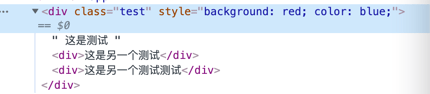
vue3 示例
<Child test="1" name="2" style="background: red; color: blue" class="test" />

<template>
  <div>
    这是测试
    <div>这是另一个测试</div>
    <div>这是另一个测试测试</div>
  </div>
</template>

<script lang="ts">
import { defineComponent } from 'vue';
import { propTypes } from '@/utils/propTypes';

export default defineComponent({
  inheritAttrs: false,
  props: {
    test: propTypes.string,
  },
  setup(props, { attrs }) {
    console.log(props);
    console.log(attrs);
    return {};
  },
});
</script>
当 inheritAttrs 为 true 时,子组件的根元素会继承所有属性(排除 props 中的属性,包括 style 和 class)(默认为 true)。  当
当 inheritAttrs 为 false 时,子组件的根元素不会继承任何属性,包括 style 和 class 也不会继承,这是和 vue2 的区别 
useAttrs
<template>
  <div>useAttrsChild.vue</div>
</template>

<script lang="ts" setup>
import { propTypes } from '@/utils/propTypes';
import { useAttrs, defineProps } from 'vue';

const props = defineProps({
  test: propTypes.string,
});
console.log(props);
const attrs = useAttrs();
console.log(attrs);
</script>
还没有留言,来发表第一条吧~