

◆
HTTP Cookie 详解:Set-Cookie、属性配置与封装
什么是 Cookie
Cookie 是一个 HTTP 请求标头,其中含有先前由服务器通过 Set-Cookie 标头投放或通过 JavaScript 的 Document.cookie 方法设置,然后存储到客户端的 HTTP cookie
Document.cookie
获取并设置与当前文档相关联的 cookie。
读取所有 cookie
allCookies 被赋值为一个字符串,该字符串包含所有的 Cookie,每条 cookie 以"分号和空格 (; )分隔 (即 key=value 键值对)。
allCookies = document.cookie;
console.log(allCookies);
写入 cookie
newCookie 是一个键值对形式的字符串。需要注意的是,用这个方法一次只能对一个 cookie 进行设置或更新。
document.cookie = newCookie;
document.cookie = 'test=message;path=/';
以下可选的 cookie 属性值可以跟在键值对后,用来具体化对 cookie 的设定/更新,使用分号以作分隔
;path=path(例如/,'/mydir') 如果没有定义,默认为当前文档位置的路径;domain=domain(例如example.com,subdomain.example.com) 如果没有定义,默认为当前文档位置的路径的域名部分;max-age=max-age-in-seconds(例如一年为60*60*24*365) 单位为毫秒;expires=date-in-GMTString-format如果没有定义,cookie会在对话结束时过期(浏览器关闭),格式Date.toUTCString() (en-US):new Date(Date.now() + 60000);secure(cookie只通过https协议传输)
HTTP Cookie 与 Set-Cookie
HTTP Cookie(也叫Web Cookie或浏览器Cookie)是服务器发送到用户浏览器并保存在本地的一小块数据。浏览器会存储cookie并在下次向同一服务器再发起请求时携带并发送到服务器上Set-Cookie:响应标头Set-Cookie被用来由服务器端向用户代理发送cookie,所以用户代理可在后续的请求中将其发送回服务器。服务器要发送多个cookie,则应该在同一响应中发送多个Set-Cookie标头。
配置参数
HttpOnly:JavaScript Document.cookie API无法访问带有HttpOnly属性的cookie;此类Cookie仅作用于服务器。Secure:标记为Secure的Cookie只应通过被HTTPS协议加密过的请求发送给服务端。Domain:Domain指定了哪些主机可以接受Cookie。如果不指定,该属性默认为同一host设置cookie,不包含子域名。Max-Age=<number>:在cookie失效之前需要经过的秒数(毫秒)。秒数为0或-1将会使cookie直接过期。假如Expires和Max-Age属性均存在,那么Max-Age的优先级更高。Expires=<date>:cookie的最长有效时间,形式为符合HTTP-date规范的时间戳。如果没有设置这个属性,那么表示这是一个会话期cookie(session)。一个会话结束于客户端被关闭时,这意味着会话期cookie在彼时会被移除。
示例
import { type Request, type Response, Router } from 'express';
import { resultSuccess } from '../../utils';

export const cookieRouter = Router({});

cookieRouter.get('/', async (req: Request, res: Response) => {
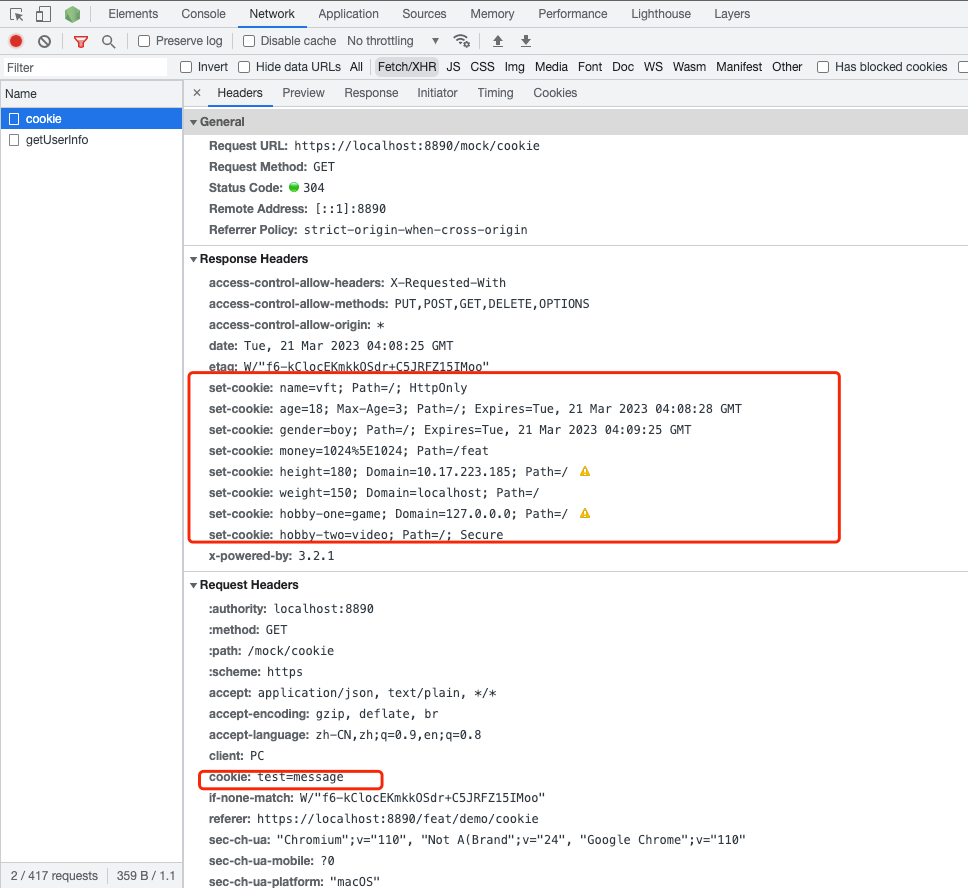
  res.cookie('name', 'vft', { httpOnly: true });
  res.cookie('age', '18', { maxAge: 3000 });
  res.cookie('gender', 'boy', { expires: new Date(Date.now() + 60000) });
  res.cookie('money', '1024^1024', { path: '/feat' });
  res.cookie('height', '180', { domain: '10.17.223.185' });
  res.cookie('weight', '150', { domain: 'localhost' });
  res.cookie('hobby-one', 'game', { domain: '127.0.0.0' });
  res.cookie('hobby-two', 'video', { secure: true });

  res.json(
    resultSuccess({
      userId: '1',
      username: '18888888888',
      realName: 'Test Admin',
      avatar: 'https://q1.qlogo.cn/g?b=qq&nk=190848757&s=640',
      desc: 'manager',
      password: '123456Aa',
      token: 'fakeToken1',
      // 修改主页路径
      roles: ['super'],
    }),
  );
});
查看请求头,请求体
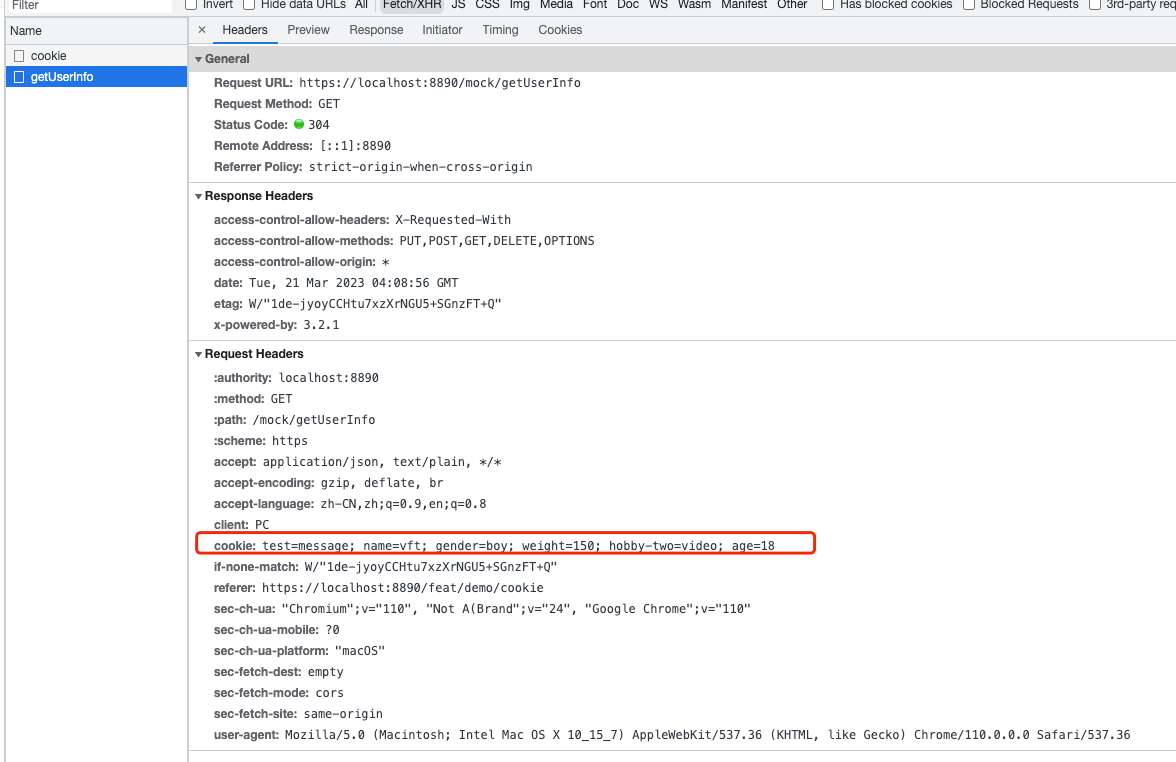
再次发送一个新请求,会发现 cookie 会自动带入
查看存储的 cookie 信息
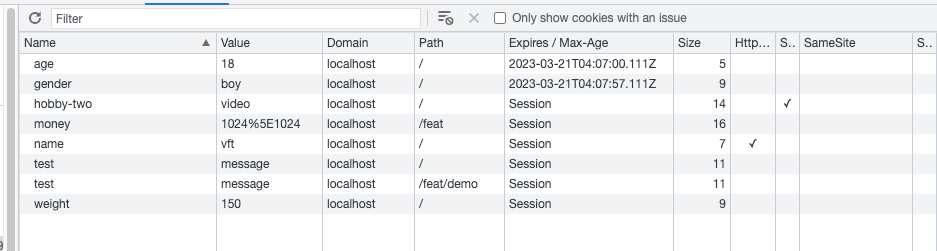
可以发现 Expires/Max-age 中有 session 一项,这个表明当前会话结束,这个缓存就会清除,这个会话结束表示的是浏览器被关闭,而不是当前网页的 tab 被关闭
cookie 跨浏览器 tab 访问
- http://localhost/blog/a.html 创建了
cookie(path=/blog) - http://localhost/blog/b.html 就可以访问这个
cookie(path=/blog属于同一目录) - http://localhost/blog/xyz/c.html 也可以访问这个
cookie(path=/blog/xyz属于同一目录下的子目录) - http://localhost/xx/d.html 就不可以访问(
path=/xx路径不一致)
cookie的跨浏览器tab数据在同源且是同path或者是当前path的子目录下数据是互通的,且修改会相互影响。
完整版 cookie 封装
export const cookieCache = {
  get: function (sKey) {
    return (
      decodeURIComponent(
        document.cookie.replace(
          new RegExp(
            '(?:(?:^|.*;)\\s*' +
              encodeURIComponent(sKey).replace(/[-.+*]/g, '\\amp;') +
              '\\s*\\=\\s*([^;]*).*$)|^.*#39;,
          ),
          '$1',
        ),
      ) || null
    );
  },
  set: function (sKey, sValue, vEnd, sPath, sDomain, bSecure) {
    if (!sKey || /^(?:expires|max\-age|path|domain|secure)$/i.test(sKey)) {
      return false;
    }
    let sExpires = '';
    if (vEnd) {
      switch (vEnd.constructor) {
        case Number:
          sExpires =
            vEnd === Infinity
              ? '; expires=Fri, 31 Dec 9999 23:59:59 GMT'
              : '; max-age=' + vEnd;
          break;
        case String:
          sExpires = '; expires=' + vEnd;
          break;
        case Date:
          sExpires = '; expires=' + vEnd.toUTCString();
          break;
      }
    }
    document.cookie =
      encodeURIComponent(sKey) +
      '=' +
      encodeURIComponent(sValue) +
      sExpires +
      (sDomain ? '; domain=' + sDomain : '') +
      (sPath ? '; path=' + sPath : '') +
      (bSecure ? '; secure' : '');
    return true;
  },
  remove: function (sKey, sPath, sDomain) {
    if (!sKey || !this.has(sKey)) {
      return false;
    }
    document.cookie =
      encodeURIComponent(sKey) +
      '=; expires=Thu, 01 Jan 1970 00:00:00 GMT' +
      (sDomain ? '; domain=' + sDomain : '') +
      (sPath ? '; path=' + sPath : '');
    return true;
  },
  has: function (sKey) {
    return new RegExp(
      '(?:^|;\\s*)' +
        encodeURIComponent(sKey).replace(/[-.+*]/g, '\\amp;') +
        '\\s*\\=',
    ).test(document.cookie);
  },
  /* optional method: you can safely remove it! */
  keys: function () {
    const aKeys = document.cookie
      .replace(/((?:^|\s*;)[^\=]+)(?=;|$)|^\s*|\s*(?:\=[^;]*)?(?:\1|$)/g, '')
      .split(/\s*(?:\=[^;]*)?;\s*/);
    for (let nIdx = 0; nIdx < aKeys.length; nIdx++) {
      aKeys[nIdx] = decodeURIComponent(aKeys[nIdx]);
    }
    return aKeys;
  },
};
cookie 的缺点
- 在之前的
IE浏览器cookie生成的数量有限制 - 部分浏览器会自动清理很少使用的
cookie cookie的最大大约为4096字节,为了兼容性,一般设置不超过4095字节
还没有留言,来发表第一条吧~